Module Release Notes

Filter By:

Modules
Filter By

0 Modules Selected Clear All

Type of change:

All

Breaking Change

Bug Fix

Enhancement

API Response Change

9 January 2026ID Card Validation

Enhanced Minor PAN Detection

Improved accuracy in detecting Minor PAN cards through integrated face detection and keyword validation.

EnhancementAPI Response Change

What's New?

  • Enhanced detectMinor parameter now leverages FRaaS (Face Recognition as a Service) API for reliable face detection
  • Dual-layer validation combining face detection results with OCR-based keyword matching
  • Improved accuracy in distinguishing between legitimate PAN cards and Minor PAN cards

Why the change?

  • To reduce high false positive rates where legitimate names similar to the keyword "MINOR" were incorrectly flagged
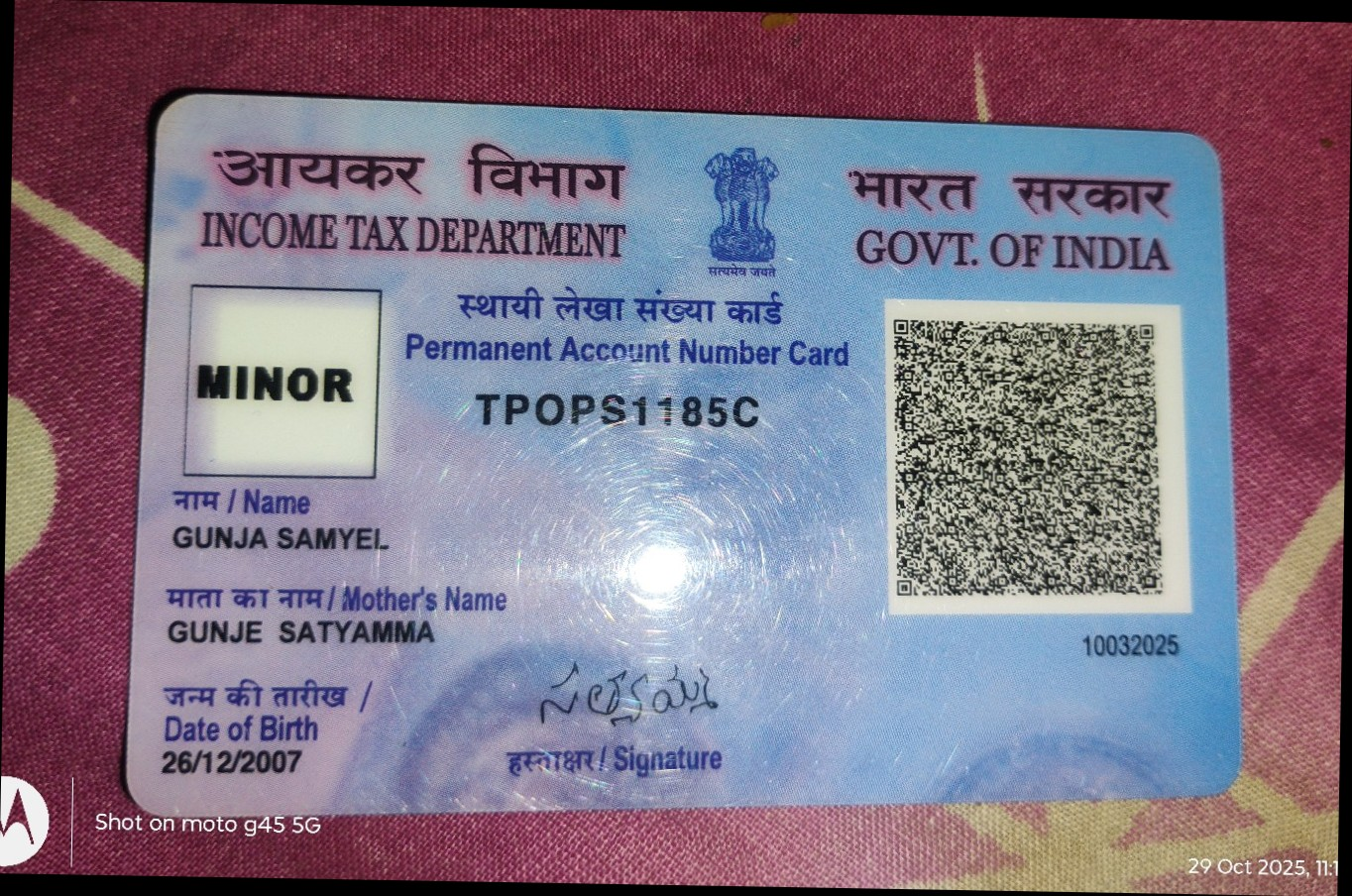
  • To provide more reliable Minor PAN detection by leveraging the fact that Minor PANs contain "MINOR" text instead of a photograph

What do you need to do?

  • Use the parameter "detectMinor": "yes" in your request payload to activate the updated detection logic

API Request
curl --location 'https://ind-docs.hyperverge.co/v2.0/readKYC' \
--header 'appId: <your_app_id>' \
--header 'appKey: <your_app_key>' \
--header 'transactionId: <transaction_id>' \
--form 'image=@"/path/to/pan_image.png"' \
--form 'detectMinor=yes'

  • Sample Input:

Sample Minor PAN card input

API Response
{
"status": "success",
"statusCode": "200",
"result": [
{
"type": "pan",
"details": {
"name": {
"conf": 95,
"value": "<Name>"
},
"father": {
"conf": 94,
"value": "<Father_Name>"
},
"date": {
"conf": 90,
"value": "<DD/MM/YYYY>"
},
"pan_no": {
"conf": 94,
"value": "XXXXXXXXXC"
},
"date_of_issue": {
"conf": 99,
"value": "<DD/MM/YYYY>"
},
"tag": "<Transaction_Tag>",
"minor": "yes"
}
}
]
}

24 December 2025Digilocker

Improved Instructions UX in DigiLocker flows on SDK

Improved the Instructions screen in the DigiLocker flows on SDK to better guide users during the consent step.

Enhancement

What's New?

  • Updated the Instructions UI with clear, action-focused visual cues to guide users on selecting required documents during the DigiLocker consent step.

Why the change?

  • After the removal of pre-selected checkboxes on the DigiLocker consent screen, users were unclear about which documents needed to be selected, leading to an increase in consent-missing errors.
  • This update helps by:
    1. Clearly guiding users on the documents to select during consent.
    2. Reducing consent-related drop-offs through better visual education.

What do you need to do?

  • Move to the latest module version available by reaching out to your SPOC.

19 December 2025ID Card Validation

AI-Generated ID Card Detection

Introduced forgery detection capability to identify AI-generated documents across Indian standard KYC documents.

EnhancementAPI Response Change

What's New?

  • Added a new forgeryChecks.detectAiForgery parameter to the ID Card Validation API that detects whether an uploaded identity document is AI-generated or forged. This feature is now available for the following Indian PhotoID documents: Aadhaar, PAN Card, Driving License, Passport, and Voter ID.

Why the change?

  • With the rise of AI-generated documents, this enhancement adds a layer of security to help identify fraudulent documents during the verification process, protecting your platform from sophisticated forgery attempts.

What do you need to do?

  • To enable forgery detection, add the forgeryChecks.detectAiForgery parameter to your API request and set it to "yes".

Sample Request
curl --location --request POST 'https://ind.idv.hyperverge.co/v1/readId' \
--header 'Content-Type: multipart/form-data' \
--header 'appid: <Enter_the_HyperVerge_appId>' \
--header 'appkey: <Enter_the_HyperVerge_appKey>' \
--header 'transactionId: <Enter_the_HyperVerge_transactionID>' \
--form 'pdf=@"<path_to_file>"' \
--form 'countryId="<Enter_the_country_id>"' \
--form 'documentId="<Enter_the_document_id>"' \
--form 'expectedDocumentSide="<Enter_the_expected_document_side>"' \
--form 'forgeryChecks.detectAiForgery="yes"' //new parameter

  • The API response will include an additional aiForgery object with the following possible values:

    • "yes" - Document is detected as AI-generated/forged
    • "no" - Document appears authentic
    • "not_supported" - Document type does not support AI forgery detection

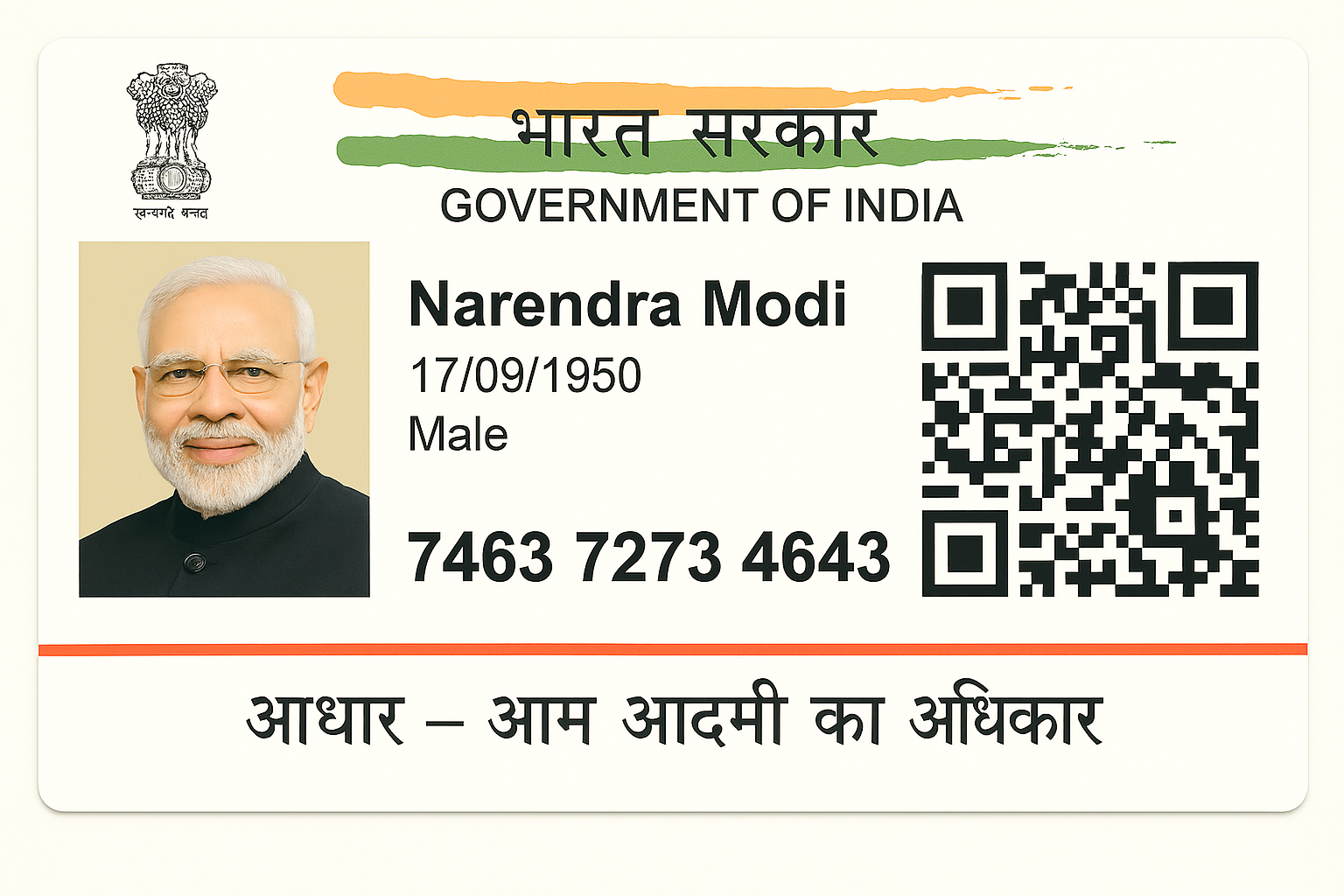
  • Sample Input:

Sample AI-generated document that returns aiForgery value as 'yes'

Response Structure
{
"status": "success",
"statusCode": 200,
"metadata": {
"requestId": "<Request_ID>",
"transactionId": "<Transaction_ID>"
},
"result": {
"details": [
{
"idType": "aadhaar_front_bottom",
"fieldsExtracted": {
"firstName": {
"value": ""
},
"middleName": {
"value": ""
},
"lastName": {
"value": ""
},
"fullName": {
"value": "Narendra Modi"
},
"dateOfBirth": {
"value": "17-09-1950"
},
"dateOfIssue": {
"value": ""
},
"dateOfExpiry": {
"value": ""
},
"countryCode": {
"value": ""
},
"type": {
"value": ""
},
"address": {
"value": "",
"additionalInfo": "",
"street": "",
"houseNumber": "",
"district": "",
"province": "",
"zipCode": ""
},
"gender": {
"value": "M"
},
"idNumber": {
"value": ""
},
"placeOfBirth": {
"value": ""
},
"placeOfIssue": {
"value": ""
},
"yearOfBirth": {
"value": ""
},
"age": {
"value": ""
},
"fatherName": {
"value": ""
},
"motherName": {
"value": ""
},
"husbandName": {
"value": ""
},
"spouseName": {
"value": ""
},
"nationality": {
"value": ""
},
"mrzString": {
"value": "",
"idNumber": "",
"fullName": "",
"gender": "",
"dateOfBirth": "",
"dateOfExpiry": "",
"nationality": ""
},
"homeTown": {
"value": ""
}
},
"croppedImageUrl": "",
"forgeryChecks": {
"aiForgery": { // new response parameter
"value": "yes"
}
}
}
],
"summary": {
"action": "pass",
"details": []
}
}
}

2 December 2025Digilocker

Auto Redirection to Pin / Pinless DigiLocker Flows with SDK

Added support for auto redirection to Pin or Pinless DigiLocker flows in the SDK.

Enhancement

What's New?

  • Added mobile-number–based flow selection that automatically routes users to Pin or Pinless DigiLocker flows based on their account status.

Why the change?

  • Earlier, users were often required to manually choose between Pin and Pinless flows, which led to edge cases where users choose the wrong flow and dropped off due to this.
  • This enhancement helps in:
    1. Enabling automated routing to Pinless or Pin Based screens basis user account status.
    2. Reducing user friction by removing touchpoints for them to manually select the status of their accounts.

What do you need to do?

  • Pass the user's mobile number as part of the SDK/module output.
  • Move to the latest module version available by reaching out to your SPOC.

20 November 2025Selfie Validation

Enhanced Dull Check Model

Improved the Dull check model to more accurately flag dull or poorly lit images.

Enhancement

What's New?

  • Enhanced Dull Check model with refined thresholds for improved accuracy in detection of dull and low light selfies.

Why the change?

  • To address gaps in dull image detection and ensure higher accuracy for edge cases that were not being consistently flagged earlier.

What do you need to do?

  • No changes required. Existing integrations will automatically reflect the updated model enhancements.

17 November 2025Selfie Validation

Enhanced White Background Check Model

Enhanced the White Background Check to more accurately validate compliant backgrounds for digital KYC and telecom onboarding.

Enhancement

What's New?

  • Refined background classification to better distinguish acceptable white/light-toned backgrounds from non-compliant ones.

Why the change?

  • To ensure compliance with RBI KYC requirements and telecom standards and improve background validation accuracy.

What do you need to do?

  • No changes required. Existing integrations will automatically reflect the updated model enhancements.

30 September 2025CKYC

Disability Parameters for KYC Accessibility

Introduced Disability Parameters in the CKYC Upload flows to capture disability details for individuals and related persons.

Breaking ChangeAPI Response Change

What's New?

  • A new mandatory parameter, isDifferentlyAbled, has been added to the CKYC Upload flows with a default value of "no".
  • If isDifferentlyAbled is set to yes, the following parameters become mandatory:

    • typeOfImpairment - This parameter specifies the impairment type using the corresponding code from the CKYC impairment code list.
    • percentageOfImpairment - This parameter enters the degree of impairment as a numeric percentage value (1-100).
    • udidNumber - This parameter provides the 18-character UDID string, formatted as two alphabets followed by sixteen digits.
  • These parameters apply to:

    • Individuals, and
    • Related persons of Individual and Legal Entity records.

Why the change?

  • This update ensures CKYC compliance with the Supreme Court directive on digital KYC accessibility for persons with disability, supporting inclusivity and accurate data capture.

What do you need to do?

  • Sample Request:

Sample Request
curl --location --request POST 'https://ind-ckyc.hyperverge.co/api/v1/customer/upload' --header 'Content-Type: multipart/form-data' \
--header 'appId: <Enter_the_HyperVerge_appId>' \
--header 'appKey: <Enter_the_HyperVerge_appKey>' \
--header 'transactionId: <Enter_the_HyperVerge_transactionID>' \
--form 'metadata="{
"constitutionType": "01",
"isDifferentlyAbled": "yes", // new parameter
"percentageOfImpairment": 20, // mandatory if isDifferentlyAbled is yes
"typeOfImpairment": 1, // mandatory if isDifferentlyAbled is yes
"udidNumber": "<Enter_the_udid_number>", // mandatory if isDifferentlyAbled is yes
"residentialStatus": "<Enter_the_residential_status>", // new parameter
"branchCode": "<Enter_the_branch_code>",
"accountType": "01",
"applicantNamePrefix": "<Enter_the_applicant_name_prefix>",
"applicantFirstName": "<Enter_the_applicant_first_name>",
"applicantMiddleName": "<Enter_the_applicant_middle_name>",
"applicantLastName": "<Enter_the_applicant_last_name>",
"applicantMaidenNamePrefix": "<Enter_the_applicant_maiden_name_prefix>",
"applicantMaidenFirstName": "<Enter_the_applicant_maiden_first_name>",
"applicantMaidenMiddleName": "<Enter_the_applicant_maiden_middle_name>",
"applicantMaidenLastName": "<Enter_the_applicant_maiden_last_name>",
"fatherNamePrefix": "<Enter_the_father_name_prefix>",
"fatherFirstName": "<Enter_the_father_first_name>",
"fatherMiddleName": "<Enter_the_father_middle_name>",
"fatherLastName": "<Enter_the_father_last_name>",
"spouseNamePrefix": "<Enter_the_spouse_name_prefix>",
"spouseFirstName": "<Enter_the_spouse_first_name>",
"spouseMiddleName": "<Enter_the_spouse_middle_name>",
"spouseLastName": "<Enter_the_spouse_last_name>",
"motherNamePrefix": "<Enter_the_mother_name_prefix>",
"motherFirstName": "<Enter_the_mother_first_name>",
"motherMiddleName": "<Enter_the_mother_middle_name>",
"motherLastName": "<Enter_the_mother_last_name>",
"gender": "<Enter_the_gender>",
"dob": "<Enter_the_dob>",
"pan": "<Enter_the_pan>"/ "<FORM_60>", // pass form 60 if PAN unavailable
"permanentCurrentAddressMatch": "Y",
"address": {
"line1": "<Enter_the_address_line1>",
"line2": "<Enter_the_address_line2>",
"line3": "<Enter_the_address_line3>",
"city": "<Enter_the_city>",
"district": "<Enter_the_district>",
"state": "<Enter_the_state>",
"country": "<Enter_the_country>",
"pincode": "<Enter_the_pincode>",
"proof": "<Enter_the_proof>"
},
"currentAddress": {
"line1": "<Enter_the_current_address_line1>",
"line2": "<Enter_the_current_address_line2>",
"line3": "<Enter_the_current_address_line3>",
"city": "<Enter_the_current_city>",
"district": "<Enter_the_current_district>",
"state": "<Enter_the_current_state>",
"country": "<Enter_the_current_country>",
"pincode": "<Enter_the_current_pincode>",
"proof": "<Enter_the_current_proof>"
},
"contact": {
"residenceTelephoneStdCode": "<Enter_the_residence_telephone_std_code>",
"residenceTelephone": "<Enter_the_residence_telephone>",
"officeTelephoneStdCode": "<Enter_the_office_telephone_std_code>",
"officeTelephone": "<Enter_the_office_telephone>",
"mobileIsdCode": "<Enter_the_mobile_isd_code>",
"mobile": "<Enter_the_mobile>",
"email": "<Enter_the_email>"
},
"idDetails": [
{
"type": "<Enter_the_id_type>",
"number": "<Enter_the_id_number>"
}
],
"dateOfDeclaration": "<Enter_the_date_of_declaration>",
"placeOfDeclaration": "<Enter_the_place_of_declaration>",
"dateOfKYCVerification": "<Enter_the_date_of_kyc_verification>",
"typeOfDocumentSubmitted": "<Enter_the_type_of_document_submitted>",
"kycVerificationName": "<Enter_the_kyc_verification_name>",
"kycVerificationDesignation": "<Enter_the_kyc_verification_designation>",
"kycVerificationBranch": "<Enter_the_kyc_verification_branch>",
"kycVerificationEmpCode": "<Enter_the_kyc_verification_emp_code>"
}"
--form 'photo=@"<path_to_photo>"' \
--form 'idFront=@"<path_to_front_side_of_ID>"'
// rest of the optional parameters as per the CKYC Upload API documentation

Sample Response
{
"status": "success",
"statusCode": "200",
"result": {
"transactionid": "<Transaction_ID>",
"message": "Request for upload has been successfully registered"
}
}

30 September 2025Selfie Validation

Enhanced Eyes Closed Model Release

Improved eyes closed detection model to more accurately flag both closed eyes and squinting cases.

Enhancement

What's New?

  • Enhanced eyes closed model with refined thresholds to improve accuracy, now also detecting and flagging squinting cases.

Why the change?

  • To reduce misses in cases of squinting eyes, ensuring more consistent and accurate flagging of eyes closed scenarios.

What do you need to do?

  • No changes required. Existing integrations will automatically reflect the updated model enhancements.

30 September 2025Selfie Validation

Enhanced Blur Check Model Release

Enhanced model for Blur Check to improve accuracy in detection of blur cases.

Enhancement

What's New?

  • A new checkStrictBlur flag to improve the accuracy for detection of blur selfies.

Why the change?

  • To address gaps in blur detection and ensure higher accuracy for edge cases that were not being consistently flagged earlier.

What do you need to do?

  • If you wish to enable stricter blur checks, please update your integration to include the checkStrictBlur parameter and set it as "yes". Existing blur detection continues to work without changes if already enabled.

API Request - Global Selfie Validation API
curl --location 'https://ind.idv.hyperverge.co/v1/checkLiveness' \
--header 'appId: <Enter_the_HyperVerge_appId>' \
--header 'appKey: <Enter_the_HyperVerge_appKey>' \
--header 'transactionId: <Enter_the_HyperVerge_transactionID>' \
--form 'image=@"<image>"' \
--form 'checkStrictBlur="yes"'

API Request - India Selfie Validation API
curl --location 'https://ind-faceid.hyperverge.co/v1/photo/liveness' \
--header 'appId: <Enter_the_HyperVerge_appId>' \
--header 'appKey: <Enter_the_HyperVerge_appKey>' \
--header 'transactionId: <Enter_the_HyperVerge_transactionID>' \
--form 'image=@<image>' \
--form 'checkStrictBlur="yes"'

28 August 2025CKYC

Enhanced Pre-Masked Aadhaar Detection

Addition of a new parameter to improve detection of masking status for non-standard Aadhaar cards in the Mask Aadhaar API.

Enhancement

What's New

  • A new optional parameter, enhancePreMasked, to improve categorisation of non-standard Aadhaar cards.
  • This works only when checkPreMasked is set to "yes".

Why the change?

  • To enhance accuracy in detecting whether Aadhaar numbers are already masked, especially for formats such as DigiLocker Aadhaar cards.

What do you need to do?

  • To enable improved detection of pre-masked Aadhaar numbers, add the parameters "checkPreMasked": "yes" and "enhancePreMasked": "yes" in your request payload.

API Request
curl --location 'https://ind-ckyc.hyperverge.co/api/v1/maskAadhaar' \
--header 'appId: <Enter_the_HyperVerge_appId>' \
--header 'appKey: <Enter_the_HyperVerge_appKey>' \
--header 'transactionId: <Enter_the_HyperVerge_transactionID>' \
--form 'file=@"/path/to/file"' \
--form 'returnMaskingInfo="yes"' \
--form 'checkPreMasked="yes"' \ //pre-requisite parameter
--form 'enhancePreMasked="yes"' //new parameter

API Response
{
"status": "success",
"statusCode": "200",
"result": {
"docType": "AADHAAR",
"inputFile": "photo.jpeg",
"maskedFile": "photo_masked.jpeg",
"maskedOccurences": {
"standardAadhaar": 1,
"nonStandardAadhaar": 0
},
"maskedFileUrl": "", //s3 URL of the masked file
"totalPages": 1,
"pageDetails": [
{
"page": 1,
"maskedOccurences": {
"standardAadhaar": 1,
"nonStandardAadhaar": 0
}
}
],
"maskingInfo": {
"masked": "yes"
}
}
}

12 August 2025Digilocker

Enhanced DigiLocker Document Retrieval with XML Support

Support for XML files has been added for PAN and Driving License in the docDetails API.

Enhancement

What's New

  • Support for XML files in the docDetails API API
    1. Clients can now fetch PAN and DL in XML format, providing added flexibility for storage and compliance needs.

Why the change?

  • Earlier, the docDetails API only supported the Pan and DL file as part of the output. This created gaps for clients requiring XML for PAN and DL due to in-house compliance, regulatory requirements or downstream use cases.
  • This enhancement helps in:
    1. Supporting compliance requirements by enabling PAN and DL XML storage.
    2. Solves for downstream use cases where Digilocker XML is required.

What do you need to do?

  • Add the parameters panXMLFile and dlXMLFile to your API request to retrieve XML files.

Sample Request
curl --location 'https://ind-verify.hyperverge.co/api/digilocker/docDetails' \
--header 'Content-Type: application/json' \
--header 'appId: <Enter_the_HyperVerge_appId>' \
--header 'appKey: <Enter_the_HyperVerge_appKey>' \
--data '{
"referenceId": "Unique ref Id used in the Digilocker flow",
"dl":"yes",
"pan":"yes",
"panXMLFile": "yes",
"dlXMLFile":"yes"
}'

30 July 2025CKYC

Enhanced Classification for Non-Aadhaar Documents

Addition of a new parameter in the request payload of the Mask Aadhaar API to improve categorisation of Non-Aadhaar documents like PAN, Voter ID, Cheques, etc.

Enhancement

What's New?

  • A new flagNonAadhaarCards parameter to enhance Non-Aadhaar document classification; this works only when maskAllAadhaarNumbers is set to "yes".

Why the change?

  • To improve accuracy in identifying Non-Aadhaar documents, ensuring smoother downstream processing and analytics.

What do you need to do?

  • Enable the parameter "maskAllAadhaarNumbers": "yes" and add the new parameter "flagNonAadhaarCards": "yes" in your request payload.

API Request
curl --location 'https://ind-ckyc.hyperverge.co/api/v1/maskAadhaar' \
--header 'appId: appid' \
--header 'appKey: appkey' \
--header 'transactionid: test' \
--form 'file=@"/path/to/file"' \
--form 'returnMaskingInfo="yes"' \
--form 'checkPreMasked="yes"' \
--form 'maskAllAadhaarNumbers="yes"' \ //pre-requisite parameter
--form 'flagNonAadhaarCards="yes"' //new parameter

API Response
{
"status": "success",
"statusCode": "200",
"result": {
"docType": "NOT_AADHAAR", //key to consume the correct classification of documents
"inputFile": "photo.jpeg",
"maskedFile": "photo_masked.jpeg",
"maskedOccurences": {
"standardAadhaar": 0,
"nonStandardAadhaar": 0
},
"maskedFileUrl": "", //s3 URL of the masked file
"totalPages": 1,
"pageDetails": [
{
"page": 1,
"maskedOccurences": {
"standardAadhaar": 0,
"nonStandardAadhaar": 0
}
}
],
"maskingInfo": {
"masked": "not_sure"
}
}
}

25 June 2025ID Card Validation

India OCR Updates: Enhanced Classifier for New ID Formats

Improved classifier for India OCR API to improve accuracy for existing and new ID formats.

Enhancement

What's New?

  • A new classifier model for the India OCR API to improve support for both existing and newer ID card formats.

Why the Change?

  • To enhance classification accuracy for newer or updated ID formats that the previous model was unable to classify reliably.

What Do You Need to Do?

  • No changes needed, existing integrations will reflect the update.
  • For additional assistance or queries, please contact our support team at support@hyperverge.co.
31 May 2025CKYC

Docker-based CKYC Search & Download Solution

Introduction of a Docker-based solution for CKYC operations to meet CERSAI's OTP consent and data residency mandates.

Breaking ChangeAPI Response Change

What's New

  • A self-deployable Docker package for OTP-based CKYC Search and Download, enabling secure and compliant integration from the Regulated Entity's on-prem or cloud setup — with no dependency on HyperVerge's cloud.

Why the change?

  • CERSAI now mandates:
    1. OTP-based user consent before CKYC downloads
    2. Information of CKYCRR records to remain within the RE's infrastructure
  • Our Docker-based solution is designed to help you stay fully compliant while maintaining complete control over your data and infrastructure.

What do you need to do?

30 May 2025CKYC

New Residential Status field and address proof rules

Addition of a new parameter and updated address proof rules for foreign nationals in CKYC operations.

Breaking ChangeAPI Response Change

What's New

  • A new mandatory field, Residential Status has been added to the CKYC Upload API and is applicable to all Individual records and related persons in both Individual and Legal Entity records.
  • The applicable values to the field are:
    1. Resident Individual
    2. Non-Resident Indian (NRI)
    3. Foreign National
    4. Person of Indian Origin (PIO)
  • If the selected Residential Status is Foreign National and the Proof of Identity is one of:
    1. Passport
    2. Driving License
    3. Voter ID

    Then the following address proof will be accepted:
    • Documents issued by foreign government departments
    • Letters from the Foreign Embassy or Mission in India

Why the change?

  • Accurate residency classification and alternate address proof options for foreign nationals now ensure smoother CKYC processing and full compliance with CKYCRR guidelines.

What do you need to do?

  • Update your API integration to include the new residentialStatus field in the request payload.

API Request
curl --location --request POST 'https://ind-ckyc.hyperverge.co/api/v1/customer/upload' \
--header 'Content-Type: application/json' \
--header 'appId: <Enter_the_HyperVerge_appId>' \
--header 'appKey: <Enter_the_HyperVerge_appKey>' \
--header 'transactionId: <Enter_the_HyperVerge_transactionID>' \
--form 'metadata={
"constitutionType": "01",
"residentialStatus": "<Enter_the_residential_status>", // the new parameter
"branchCode": "<Enter_the_branch_code>",
"accountType": "<Enter_the_account_type>",
"applicantNamePrefix": "<Enter_the_applicant_name_prefix>",
"applicantFirstName": "<Enter_the_applicant_first_name>",
"applicantMiddleName": "<Enter_the_applicant_middle_name>",
"applicantLastName": "<Enter_the_applicant_last_name>",
"applicantMaidenNamePrefix": "",
"applicantMaidenFirstName": "",
"applicantMaidenMiddleName": "",
"applicantMaidenLastName": "",
"fatherNamePrefix": "<Enter_the_father_name_prefix>",
"fatherFirstName": "<Enter_the_father_first_name>",
"fatherMiddleName": "<Enter_the_father_middle_name>",
"fatherLastName": "<Enter_the_father_last_name>",
"spouseNamePrefix": "<Enter_the_spouse_name_prefix>",
"spouseFirstName": "<Enter_the_spouse_first_name>",
"spouseMiddleName": "<Enter_the_spouse_middle_name>",
"spouseLastName": "<Enter_the_spouse_last_name>",
"motherNamePrefix": "<Enter_the_mother_name_prefix>",
"motherFirstName": "<Enter_the_mother_first_name>",
"motherMiddleName": "<Enter_the_mother_middle_name>",
"motherLastName": "<Enter_the_mother_last_name>",
"gender": "<Enter_the_gender>",
"dob": "<Enter_the_dob>",
"pan": "<Enter_the_pan>",
"permanentCurrentAddressMatch": "<Enter_the_permanent_current_address_match>",
"address": {
"line1": "<Enter_the_address_line1>",
"line2": "<Enter_the_address_line2>",
"line3": "<Enter_the_address_line3>",
"city": "<Enter_the_city>",
"district": "<Enter_the_district>",
"state": "<Enter_the_state>",
"country": "<Enter_the_country>",
"pincode": "<Enter_the_pincode>",
"proof": "<Enter_the_proof>"
},
"currentAddress": {
"line1": "<Enter_the_current_address_line1>",
"line2": "<Enter_the_current_address_line2>",
"line3": "<Enter_the_current_address_line3>",
"city": "<Enter_the_current_city>",
"district": "<Enter_the_current_district>",
"state": "<Enter_the_current_state>",
"country": "<Enter_the_current_country>",
"pincode": "<Enter_the_current_pincode>",
"proof": "<Enter_the_current_proof>"
},
"contact": {
"residenceTelephoneStdCode": "<Enter_the_residence_telephone_std_code>",
"residenceTelephone": "<Enter_the_residence_telephone>",
"officeTelephoneStdCode": "<Enter_the_office_telephone_std_code>",
"officeTelephone": "<Enter_the_office_telephone>",
"mobileIsdCode": "<Enter_the_mobile_isd_code>",
"mobile": "<Enter_the_mobile>",
"email": "<Enter_the_email>"
},
"idDetails": [
{
"type": "<Enter_the_id_type>",
"number": "<Enter_the_id_number>"
}
],
"dateOfDeclaration": "<Enter_the_date_of_declaration>",
"placeOfDeclaration": "<Enter_the_place_of_declaration>",
"dateOfKYCVerification": "<Enter_the_date_of_kyc_verification>",
"typeOfDocumentSubmitted": "<Enter_the_type_of_document_submitted>",
"kycVerificationName": "<Enter_the_kyc_verification_name>",
"kycVerificationDesignation": "<Enter_the_kyc_verification_designation>",
"kycVerificationBranch": "<Enter_the_kyc_verification_branch>",
"kycVerificationEmpCode": "<Enter_the_kyc_verification_emp_code>",
"relatedPersons": [
{
"typeOfRelation": "<Enter_the_type_of_relation>",
"applicantNamePrefix": "<Enter_the_applicant_name_prefix>",
"applicantFirstName": "<Enter_the_applicant_first_name>",
"applicantMiddleName": "<Enter_the_applicant_middle_name>",
"applicantLastName": "<Enter_the_applicant_last_name>",
"applicantMaidenNamePrefix": "",
"applicantMaidenFirstName": "",
"applicantMaidenMiddleName": "",
"applicantMaidenLastName": "",
"fatherNamePrefix": "<Enter_the_father_name_prefix>",
"fatherFirstName": "<Enter_the_father_first_name>",
"fatherMiddleName": "<Enter_the_father_middle_name>",
"fatherLastName": "<Enter_the_father_last_name>",
"spouseNamePrefix": "<Enter_the_spouse_name_prefix>",
"spouseFirstName": "<Enter_the_spouse_first_name>",
"spouseMiddleName": "<Enter_the_spouse_middle_name>",
"spouseLastName": "<Enter_the_spouse_last_name>",
"motherNamePrefix": "<Enter_the_mother_name_prefix>",
"motherFirstName": "<Enter_the_mother_first_name>",
"motherMiddleName": "<Enter_the_mother_middle_name>",
"motherLastName": "<Enter_the_mother_last_name>",
"aadhaar": "<Enter_the_aadhaar>",
"gender": "<Enter_the_gender>",
"dob": "<Enter_the_dob>",
"pan": "<Enter_the_pan>",
"permanentCurrentAddressMatch": "<Enter_the_permanent_current_address_match>",
"address": {
"line1": "<Enter_the_address_line1>",
"line2": "<Enter_the_address_line2>",
"line3": "<Enter_the_address_line3>",
"city": "<Enter_the_city>",
"district": "<Enter_the_district>",
"state": "<Enter_the_state>",
"country": "<Enter_the_country>",
"pincode": "<Enter_the_pincode>",
"proof": "<Enter_the_proof>"
},
"currentAddress": {
"line1": "<Enter_the_current_address_line1>",
"line2": "<Enter_the_current_address_line2>",
"line3": "<Enter_the_current_address_line3>",
"city": "<Enter_the_current_city>",
"district": "<Enter_the_current_district>",
"state": "<Enter_the_current_state>",
"country": "<Enter_the_current_country>",
"pincode": "<Enter_the_current_pincode>",
"proof": "<Enter_the_current_proof>"
},
"contact": {
"residenceTelephoneStdCode": "<Enter_the_residence_telephone_std_code>",
"residenceTelephone": "<Enter_the_residence_telephone>",
"officeTelephoneStdCode": "<Enter_the_office_telephone_std_code>",
"officeTelephone": "<Enter_the_office_telephone>",
"mobileIsdCode": "<Enter_the_mobile_isd_code>",
"mobile": "<Enter_the_mobile>",
"email": "<Enter_the_email>"
},
"idDetails": [
{
"type": "<Enter_the_id_type>",
"number": "<Enter_the_id_number>"
}
],
"dateOfDeclaration": "<Enter_the_date_of_declaration>",
"placeOfDeclaration": "<Enter_the_place_of_declaration>",
"dateOfKYCVerification": "<Enter_the_date_of_kyc_verification>",
"typeOfDocumentSubmitted": "<Enter_the_type_of_document_submitted>",
"kycVerificationName": "<Enter_the_kyc_verification_name>",
"kycVerificationDesignation": "<Enter_the_kyc_verification_designation>",
"kycVerificationBranch": "<Enter_the_kyc_verification_branch>",
"kycVerificationEmpCode": "<Enter_the_kyc_verification_emp_code>"
}
]
}' \
--form 'dlFront=@"<Enter_the_path_to_the_dl_front_image>"'

API Response
{
"status": "success",
"statusCode": "200",
"result": {
"transactionid": "<Transaction_ID>",
"message": "Request for upload has been successfully registered"
}
}

23 May 2025Digilocker

DigiLocker Healthcheck API with Downtime Monitoring Dashboard

Introduction of a DigiLocker Healthcheck API integrated with the API Health Monitoring Dashboard to enable proactive detection of service disruptions in KYC flows.

Enhancement

What's New?

1.Digilocker Healthcheck API
  • A new API that evaluates the real-time health of DigiLocker services by analyzing user behavior patterns, enabling detection of performance issues even when standard error codes aren't triggered.
2. Dashboard Integration for Downtime Monitoring
  • The Healthcheck API is now part of the API Health Monitoring Dashboard, making it easier to setup proactive mail alerts and get historical performance insights

Why the change?

  • DigiLocker downtimes are difficult to detect, as they often don't trigger standard API errors—making traditional monitoring ineffective.
  • This API helps in:
    1. Improving reliability in detecting disruptions during DigiLocker KYC flows
    2. Minimizing user drop-offs through timely alerts or fallback actions

What do you need to do?

You can use the Healthcheck API in two ways:
1. Integrate into your Workflow:
  • Please contact the Solutions/Support team to get this feature enabled as part of your digilocker flow, or
2. Monitor via Dashboard Alerts:
  • To receive email notifications for API downtimes, follow these steps:
  • Log in to the HV One Dashboard and navigate to the Dev Hub.
  • Select API Health, then choose your country from the dropdown.
  • You'll now see the API Health Dashboard, displaying historical uptime data for all key APIs.
  • Click on "Get updates" at the top right and choose Email as your preferred notification method.
  • Enter the email address you'd like to subscribe, and select the specific APIs you want alerts for.
  • Click Subscribe to complete the setup

21 April 2025Digilocker

Dynamic Sign In/Sign Up Flow Routing

Introduction of a new parameter in the Digilocker Start API to enable dynamic routing to Sign In or Sign Up journeys based on user type or business logic.

Enhancement

What's New

  • Addition of the flow parameter to Start API
    1. A new optional parameter in the Start API that enables clients to direct users to Sign In or Sign Up screens for streamlined journey orchestration.

Why the Change?

Earlier, the user flow was tied to a single configuration per appID, which meant all users for a flow could only go through either the Sign In or the Sign Up flow. This enhancement helps in:

  • Enabling flexible routing to Sign In or Sign Up screens within the same app
  • Improving user experience through tailored journeys based on user type or context

What Do You Need to Do?

  • Update your Start API integration to include the new flow parameter in the request payload.
  • The parameter can be set to signin or signup based on the user type or business logic

Sample Request
curl --location 'https://ind-verify.hyperverge.co/api/digilocker/start' \
--header 'appId: <appId shared by HyperVerge>' \
--header 'appKey: <appKey shared by HyperVerge>' \
--header 'transactionID: <Unique_transactionId>>' \
--header 'Content-Type: application/json' \
--data '{
"referenceId": "<Unique_referenceId>",
"usePinlessAuth": "<yes/no>",
"flow" : "<signin/signup>"
}'

03 April 2025Bank Account Verification

Pennyless Updates: Enhanced error handling

Addition of a new parameter in the Pennyless API that helps return simplified error responses for specific account types.

Bug FixAPI Response Change

What's New

  • The newly introduced strictValidation parameter returns a failure response for Blocked and Overseas accounts when the accountName cannot be fetched — earlier, this case still returned a success response.

Why the change?

  • To ensure clarity and correctness, Overseas and Non-overseas accounts cases are now treated as errors since account name details aren't available for them.

What do you need to do?

  • To test the strictValidation flag and distinguish between Overseas and Non-overseas accounts, follow these steps:
    1. Pass thestrictValidation flag as "yes".
    2. When the strictValidation flag is passed as "yes" in the request, the system will return new response structures.
  • For Overseas accounts:

    New Response if strictValidation is set to "yes":

    API Response
    {
    "status": "failure",
    "statusCode": "422",
    "error": "Given account is an NRE account" // NRE, which stands for Non-Resident External, denotes the Overseas accounts
    }
    For Blocked Accounts:

    New Response if strictValidation is set to "yes":

    API Response
    {
    "status": "failure",
    "statusCode": "422",
    "error": "Account is blocked"
    }
  • For additional assistance or queries, please contact our support team at support@hyperverge.co.
25 Feb 2025VKYC

Call Reconnection Enhancements for Agents and Customers in VKYC

Updates to the call reconnection process, reducing scenarios like network disruptions, page refreshes, and call drops.

Enhancement

What's New

1. Agent and Customer Reconnection:
  • Agents can now reconnect to an ongoing call if the customer has not disconnected.
  • Customers and agents will see appropriate messages when a reconnection attempt is in progress.
2. Refresh Handling:
  • Calls now resume smoothly with reduced loading time when either party refreshes the page. A message is shown indicating that the agent or customer is rejoining, removing any confusion.
  • Refer to the recordings showcasing agent refresh and customer refresh screens.
3. Tab Closure Handling:
  • If either the Customer or the agent closes the tab, the system waits up to 20 seconds for them to return. Calls resume if they rejoin in time; otherwise, fallback actions apply.
  • Customers can see a message when the agent is reconnecting and can rejoin the queue or schedule a call if the agent doesn't return.
  • Refer to the screen recordings showcasing the customer and agent experiences.
4. Call Ending Improvements:
  • If the Customer ends the call, the Agents see an appropriate message for 20 seconds before being redirected to the Admin portal.
  • Refer to the recording showcasing the agent screen.
5. Network Disruption Handling:
  • Real-time alerts have been added for low network scenarios
    1. Customers can see a warning for unstable internet, while agents are notified if the customer has a poor connection.
    2. An alert banner appears at the top of the screen displaying "Your connection is poor" when the agent's own network quality drops below a threshold.
  • Refer to the recordings showcasing the customer and agent screens for network-related alerts.

Why the change?

  • To reduce confusion and friction during unexpected disruptions, making the video KYC experience smoother and more dependable.

What do you need to do?

  • To experience all enhancements, staying on the latest system version is the only action required from the users.
  • For additional assistance or queries, please contact our support team at support@hyperverge.co.
24 Feb 2025CKYC

Changes in the CKYC Identifier to improve data security

CKYC updates now mandate masking the CKYC Identifier in search and upload responses, replacing it with a new parameter for enhanced data security.

EnhancementAPI Response Change

What's New?

  1. CKYC Search:
    1. The ckycNo will now be masked in the response, showing only the last 4 digits.
    2. A new parameter, ckycRefNo, will be included in the response if returnckycRefNo is enabled in the request.
    3. A new ID type "Y," has been added for searches using ckycRefNo.
  2. CKYC Search & Download (S&D):
    1. The ckycNo will not be masked in S&D responses.
    2. Users can include the returnckycRefNo parameter in their request to receive the ckycRefNo.
  3. CKYC Upload:
    1. A new config, returnCKYCRefIDSeparately, when enabled in the CKYC Pre-Upload API, allows users to receive the CKYC reference ID separately in the response.

      • •   When returnCKYCRefIDSeparately is enabled:
        1. ckyc_ref_id is returned separately, along with ckyc_no.
        2. ckyc_no will have the following values:
          Unmasked: In successful cases.
          Masked: In 'short_confirmed_match' and 'long_confirmed_match' cases.
          Empty: In error cases (e.g., reject scenarios) – this is consistent with existing behaviour.
        3. ckyc_ref_id will have the following values:
          Non-empty: If a value is retrieved from CERSAI, such as in 'short_confirmed_match' and 'long_confirmed_match' cases.
          Empty: When no value is provided by CERSAI, including:

          • ✓  Success cases: CKYC number is available, but no reference ID.
          • ✓  Reject cases: Error scenarios with no reference ID.
      • •  When returnCKYCRefIDSeparately is disabled (current behaviour):
        1. ckyc_no will be returned in the response.
        2. ckyc_no holds CKYC number for all cases except 'short_confirmed_match' and 'long_confirmed_match'.
        3. In 'short_confirmed_match' and 'long_confirmed_match', ckyc_no holds the CKYC reference ID instead of the CKYC number.

Why the Change?

To enhance data security by minimizing direct exposure of the CKYC number, while allowing flexibility to access the required reference details.

What do you need to do?

  1. Search API:
    1. Enable returnckycRefNo in the request to receive the ckycRefNo.
    2. Use the new ID type "Y" for searches using the ckycRefNo.

    API Request
     curl --location --request POST 'https://ind-ckyc.hyperverge.co/api/v1/searchAndDownload'   
    --header 'Content-Type: application/json'
    --header 'appId: <Enter_the_HyperVerge_appId>'
    --header 'appKey: <Enter_the_HyperVerge_appKey>'
    --header 'transactionId: <Enter_the_HyperVerge_transactionID>'
    --data '{
    "idNo": "idNo",
    "idType": "Y",
    "dob": "dob",
    "returnOnlySearchResponse": "yes",
    "returnckycRefNo": "yes"
    }'
    API Response
    {
    "ckycNo": "xxxxxxxxxx9668",
    "ckycRefNo": "LEARAV29072000"
    }
  2. Search and Download API:
    1. Pass the ckycRefNo, as returned by the Search API, as the idNo and set idType to "Y" for performing downloads.

    API Request
     curl --location --request POST 'https://ind-ckyc.hyperverge.co/api/v1/searchAndDownload'   
    --header 'appId: <Enter_the_HyperVerge_appId>'
    --header 'appKey: <Enter_the_HyperVerge_appKey>'
    --header 'transactionId: <Enter_the_HyperVerge_transactionID>'
    --data '{
    "idNo": "<The_CKYC_Reference_Number_from_Search_API>",
    "idType": "Y",
    "dob": "dob"
    }'
  3. Pre-Upload API:
    1. Enable the returnCKYCRefIdSeparately parameter, to receive the CKYC Reference ID.

    2. API Request
       curl --location --request POST 'https://ind-ckyc.hyperverge.co/api/v1/config/upload'   
      --header 'appId: <Enter_the_HyperVerge_appId>'
      --header 'appKey: <Enter_the_HyperVerge_appKey>'
      --header 'transactionId: <Enter_the_HyperVerge_transactionID>'
      --data '{
      "returnCKYCRefIdSeparately": "yes" // enabling the param
      }'
      API Response: Short Match Confirmed
       {
      status: 200,
      message: 'CKYC Upload Failure',
      application_status: 'short_confirmed_match',
      appid: 'appid',
      ckyc_no: 'XXXXXXXXXX0000',
      ckyc_ref_id: 'INABCD12345678'
      errors: [
      'Last 4 digits of Aadhaar, Name, DOB and Gender match with that of CKYC no XXXXXXXXXX4810. Please download the record using CKYC REFERENCE ID.'
      ],
      transactionid: '<Transaction_ID>'
      }
      API Response: Long Match Confirmed
       {
      status: 200,
      message: 'CKYC Upload Failure',
      application_status: 'long_confirmed_match',
      appid: 'appid',
      ckyc_no: 'XXXXXXXXXX0000',
      ckyc_ref_id: 'INABCD12345678'
      errors: [
      'Last 4 digits of Aadhaar, Name, DOB and Gender match with that of CKYC no XXXXXXXXXX4810. Please download the record using CKYC REFERENCE ID.'
      ],
      transactionid: '<Transaction_ID>'
      }

      API Response: Rejection Case
       {
      status: 200,
      message: 'CKYC Upload Failure',
      application_status: 'short_reject',
      appid: 'appid',
      ckyc_no: '',
      ckyc_ref_id: ''
      errors:[],
      transactionid: '<Transaction_ID>'
      }
    3. Disable the returnCKYCRefIdSeparately parameter, to not receive the CKYC Reference ID.

    4. API Request
       curl --location --request POST 'https://ind-ckyc.hyperverge.co/api/v1/config/upload'   
      --header 'appId: <Enter_the_HyperVerge_appId>'
      --header 'appKey: <Enter_the_HyperVerge_appKey>'
      --header 'transactionId: <Enter_the_HyperVerge_transactionID>'
      --data '{
      "returnCKYCRefIdSeparately": "no" // disabling the param
      }'

      API Response: Success Case
       {
      status: 200,
      message: 'CKYC Upload Success',
      application_status: 'success',
      appid: 'appid',
      ckyc_no: '00000000000000',
      ckyc_ref_id: ''
      errors:[],
      transactionid: '<Transaction_ID>'
      }
15 Feb 2025eSign

Improved PDF Generation and enhanced Get Signed Document API

The new PDF Generator API enables flexible PDF creation, while the additional parameters in the Get Signed Document API response allow tracking of signing status and analytics.

EnhancementAPI Response Change

What's New

  • Addition of a new API, PDF Generator. This API takes the templateID /base64 file as its input along with other required details to generate a document for signing.
  • Addition of extra parameters in Get Signed Document API's response. They are as follows:
    1. Signed - This parameter indicates if signing has been done by user or not and returns a boolean value.
    2. Expired - This parameter indicates if the document has been expired or not and returns a boolean value.
    3. failureReason - This is a conditional parameter which displays the reason of failure in document signing.

Why the change?

  • To ensure fast implementation, high accuracy, and support for all document types requiring eSign, with quick turnaround times for change requests.
  • To track end-user conversion rates and to enable analytics, additional parameters have been added in Get Signed Document API.

What do you need to do?

PDF Generator API
  • Use this API to generate a PDF for e-signing.
  • If the PDF is not generated by HyperVerge, include the file, signature coordinates, and optional fields for SMS or email notifications in the request body.

API Request
curl --location 'https://ind-engine.thomas.hyperverge.co/v1/pdfGenerator'
--header 'Content-Type: application/json'
--header 'appId: <Enter_the_HyperVerge_appId>'
--header 'appKey: <Enter_the_HyperVerge_appKey>'
--header 'transactionId: <Enter_the_HyperVerge_transactionID>'
--data '{
"templateId":"<Enter_the_unique_template_ID>",
"inviteeName":"<Enter_the_name>",
"inviteePhone":"<Enter_the_phone_number>", // optional parameter
"inviteeEmail":"<Enter_the_email_address>", // optional parameter
"stampSeries":"<Enter_the_stamp_series>",
"coordinates":[ //this is only needed when the pdf is not generated by HyperVerge
{
"x1": 0,
"x2": 50,
"y1": 0,
"y2": 50,
"page": 1
}
],
"file": "", //this is only needed when the pdf is not generated by HyperVerge
"eSignHintMessage":"<Enter_the_eSign_hint_message>"
}'

API Response
{
"statusCode": 200,
"metaData": {
"requestId": "<Request_ID>",
"transactionId": "1234"
},
"result": {
"data": {
"signUrl": "<Signature_URL>",
"documentId": "<Document_ID>",
"email": "",
"name": "",
"phone": "" // displayed when inviteePhone parameter is enabled in the request
}
}
}

Get Signed Document
  • Pass the documentId received from the pdfGenerator API.
  • Optionally, set skipBase64 to true if you want a downloadable link instead of base64 data.

API Request
curl --location 'https://ind-engine.thomas.hyperverge.co/v1/getSignedDocument'
--header 'Content-Type: application/json'
--header 'appId: <Enter_the_HyperVerge_appId>'
--header 'appKey: <Enter_the_HyperVerge_appKey>'
--header 'transactionId: <Enter_the_HyperVerge_transactionID>'
--data '{
"documentId":"<Enter_the_document_ID>",
"serviceId":"<Enter_the_service_ID>"
}'

API Response
{
"status": "success",
"statusCode": 200,
"metaData": {
"requestId": "<Request_ID>",
"transactionId": "<Transaction_ID>"
},
"result": {
"data": {
"documentId": "<Document_ID>",
"s3Url": "<The_S3_URL>",
"signed": true, // the new parameter
"expired": false, // the new parameter
"userCertDetails": {
"name": "",
"pincode": "",
"gender": "",
"state": "",
"title": "",
"yob": ""
},
"inviteeDetails": {
"inviteeName": "",
"inviteeEmail": ""
}
}
}
}

22 Jan 2025Digilocker

Improved user onboarding with new DigiLocker PIN-less authentication

The DigiLocker PIN-less flow enables users to fetch their identity documents without the need for a 6-digit security PIN, offering a faster and more convenient log in experience.

Enhancement

What's New

  • By enabling the PIN-less flow, you can now log in without entering a security PIN. This simplifies the sign-in process and improves the user experience.

Why the change?

  • 15-20% drop offs happen at the PIN-Step.To reduce the user drop-off rates we simplify the sign-in process with Digilocker PIN-Less flow
  • note
    The PIN-less flow works only for pre-existing users.

What do you need to do?

  • To enable the PIN-less flow, update your API integration with the following configuration:
    Add the parameter   "usePinlessAuth": "yes"   to the Digilocker Start API.
API Request
curl --location  --request POST 'https://ind-verify.hyperverge.co/api/digilocker/start'             
--header 'appId: <Enter_the_HyperVerge_app_ID>'
--header 'appKey: <Enter_the_HyperVerge_app_Key>'
--header 'transactionId: sample_transaction_id'
--header 'Content-Type: application/json'
--data '{
"referenceId": "<Enter_the_Reference_ID>",
"redirectURL": "<Enter_the_Redirect_URL>"
"usePinlessAuth": "yes" // the new parameter
}'


  • To use PIN-less flow, users will need to have their own Digilocker credentials.
  • Please contact our team at HyperVerge to learn about the process of obtaining Digilocker credentials.
  • For additional assistance or queries, please contact our support team at support@hyperverge.co.
21 Jan 2025Bank Account Verification

Pennyless Updates: Account type identification and enhanced error handling

Addition of a new flag in the Pennyless API that helps specify account type, along with a status code updation and enhanced error handling.

EnhancementAPI Response Change

What's New

  • We have expanded our coverage of supported banks.
  • The  accountType  flag enables the isOverseasAccount check. This parameter will return "Yes" for an overseas account and "No" for a non-overseas account.
  • The status code for the error "Beneficiary Bank Offline", is updated from 503 to 424.
  • A new error case,"Unable to Validate Request," has been added.

Why the change?

  • To ensure accurate classification of overseas and non-overseas accounts, enhancing validation, and compliance.
  • To enhance error handling, a new error case has been introduced.

What do you need to do?

  • To enable the isOverseasAccount check, set the accountType flag as "Yes" in the request body.
  • Else, set the accountType flag as "No".

API Request
 curl --location 'https://ind-engine.thomas.hyperverge.co/v1/pennyless' 
--header 'Content-Type: application/json'
--header 'appId: <appId shared by HyperVerge>'
--header 'appKey: <appKey shared by HyperVerge>'
--data '{
"accountNumber": "<Enter_the_Account_Number>",
"ifsc": "<Enter_the_IFSC_Value>",
"accountType":"<Enter_Yes_or_No>" // the new flag
}'

API Response
{
"status": "success",
"statusCode": 200,
"result": {
"accountExists": true,
"message": "Bank Account details verified successfully.",
"accountName": "<Account_Holder_Name>",
"isOverseasAccount": "<Yes/No>" // new response parameter when accountType flag is enabled
},
"metaData": {
"requestId": "<Request_ID>"
}
}

The updated response for the Beneficiary Bank Offline scenario:

New Response
{
"statusCode": 424,
"status": "failure",
"error": "Beneficiary Bank Offline"
}

The new error case "Unable to validate request":

New Error Case
{
"statusCode": 424,
"status": "failure",
"error": "Unable to validate request"
}

Was this helpful?
Ask AIBeta
Hi! How can I help?
Ask me anything about HyperVerge products, APIs, and SDKs.
Try asking: